Protecting Your Work and the Connections That Matter — Part 6
What if something unusual happens during your usual work?
Imagine that you start work one morning and see an unfamiliar message on your computer.
You cannot open files you normally use. A business partner contacts you to say that they have received a suspicious email from your address.
What has happened?
It may be a computer problem. The service you use may be experiencing an outage. Or your business may have been affected by a cyberattack.
It is not unusual to be unable to identify the cause immediately.
In a situation like this, the most important thing is not to panic or try to solve everything on your own.
Even if you do not know the cause, report what you have noticed and contact someone who can help. That is the first step toward getting your work back on track.
First, tell someone what you have noticed
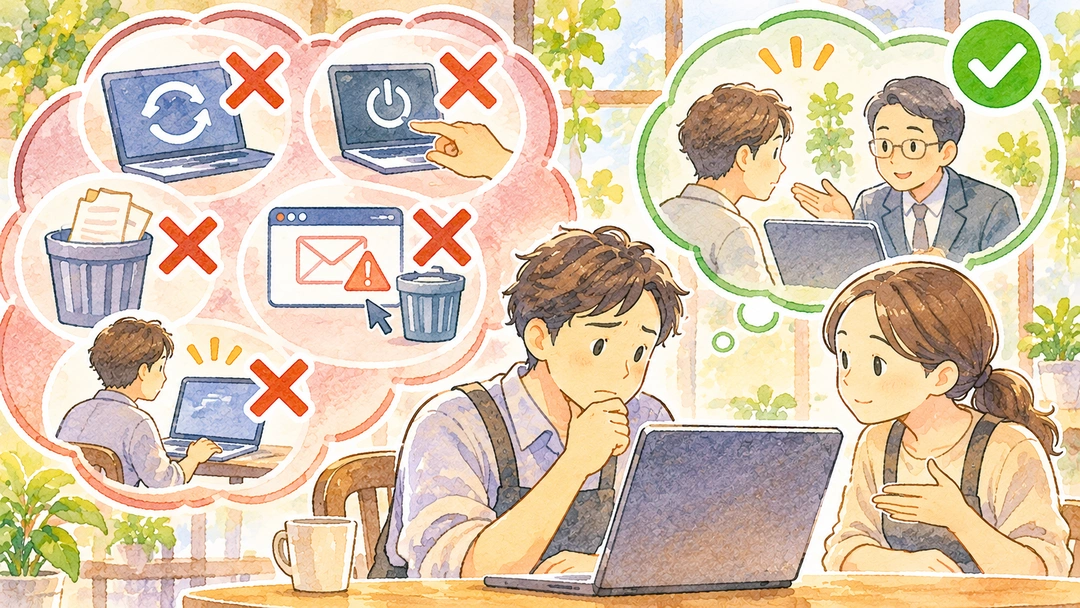
If something seems wrong, let the person responsible for managing your systems know. If you use an outside company to manage your IT, contact them.
If you work alone, contact the support desk for the service you use or another appropriate support provider.
You do not need to identify the cause before asking for help.
For example, it is enough to explain:
- When the problem started and what you noticed.
- Which computer or service is affected.
- Whether it happened just after you did something on the device.
- Whether other people or business partners are affected, too.
If possible, keep a record of warning messages on the screen or emails you received. These may help establish what happened and when.
There is one more important point:
Do not blame someone for making a mistake.
Someone may have opened a suspicious link or accidentally sent a file to the wrong person. It is far better for them to report it quickly than to hide what happened or try to deal with it alone.
Making sure that people feel safe reporting what they notice is also an important way to limit damage.
Avoid unnecessary actions that could make things worse
When something goes wrong, you may feel like restarting the computer, deleting a suspicious file, or changing settings back to the way they were.
However, if a cyberattack is suspected, actions like these may destroy records that are needed to understand what happened.
On the other hand, leaving a compromised device connected to the network may allow the problem to spread to other devices.
Depending on the situation, it may be necessary to disconnect the affected device from the network to limit further damage.
The right action depends on what has happened. If you are not confident about what to do, do not try to perform technical operations on your own. Contact an administrator or specialist, using a phone or another communication method if necessary.
In particular, avoid doing the following on your own:
- Resetting the computer or deleting large numbers of files.
- Restarting or powering off a device before relevant records have been checked.
- Deleting suspicious messages or warning screens.
- Continuing to use the device as usual without understanding what is happening.
       Notice something unusual
                 |
                 v
       Avoid unnecessary actions
                 |
                 v
       Contact an administrator or specialist
                 |
                 v
       Check the situation and limit the impact
                 |
                 v
       Notify and report to relevant parties
                 |
                 v
       Restore service after safety is confirmed
You do not have to make every decision yourself. The important thing is to report the situation and ask for help.

Tell the right people what they need to know
Depending on the problem, you may need to contact people other than your IT provider.
For example, if you notice an unauthorized payment, contact your bank or payment provider as soon as possible. If you suspect a crime, consult the police. If personal information may have been exposed, consult the guidance from Japan’s Personal Information Protection Commission (PPC) and determine whether a report or notification is required. If your business operates in another country, consult the relevant data-protection authority there.
| What has happened | Examples of who to contact |
|---|---|
| A computer or network problem | IT support provider, device manufacturer, service provider |
| An unauthorized transfer or payment | Bank, payment provider |
| Suspected unauthorized access or criminal activity | Police |
| Exposure of personal information | The relevant privacy regulator or authority |
Japan’s Information-technology Promotion Agency (IPA) also provides a cybersecurity consultation service for businesses and organizations. If you need help with technical issues, a public consultation service like this may be useful.
If customers or business partners need to be informed, contact them at an appropriate time and explain what you have confirmed.
You do not need to spread unverified information while the cause is still unknown. At the same time, do not delay necessary warnings if other people need to take precautions.

Getting your work back on track
Once the cause has been identified and the necessary steps have been taken, you can begin to resume your work.
However, just because a computer or service is working again does not necessarily mean everything is back to normal.
Check that it is safe to use, that important data has been restored correctly, and that communication with customers and business partners is working as it should.
Then resume work step by step.
When things have settled down, take some time to look back at what happened.
- What happened?
- Where and when did you notice the problem?
- What would have helped you respond sooner?
The purpose is not to find someone to blame. It is to make it easier to respond calmly if a similar problem happens again.
It may not be possible to prevent every incident. Even so, noticing a problem, asking for help, and responding appropriately can reduce its impact on your business.
Cybersecurity is not only about preventing problems. It is also about being able to recover and keep working when something does go wrong.

Looking back on the six-part series
Over these six articles, we have explored cybersecurity through the everyday work of small businesses.
Here is a quick summary of what we have covered:
| Part | Topic | Key takeaway |
|---|---|---|
| Part 1 | Is That Wi-Fi Really Just for Your Customers? | Something we use casually may be connected to more than we realize. |
| Part 2 | You Don’t Do Your Work Alone | Our work is supported by many people, companies, and services. |
| Part 3 | The Problem Isn’t Just Stolen Information | If information or systems become unavailable, the work itself may stop. |
| Part 4 | Problems Can Come from Places You Don’t Expect | People and services we trust can sometimes be abused by attackers. |
| Part 5 | You Don’t Have to Protect Everything at Once. Start with What You Can Do. | Start with practical steps and build habits you can maintain. |
| Part 6 | If Something Goes Wrong, What Should You Do First? | Do not deal with an incident alone. Report it, seek help, and work toward recovery. |
What we hoped to convey throughout this series is that cybersecurity should not be treated as a difficult subject that only specialists need to think about.
Wi-Fi, email, reservations, payments, and accounting tools make our work easier. Their convenience depends on connections with many people and services.
That is why the things worth protecting are not only our computers and information.
They include the work we do every day, the promises we make to customers, the trust we build with business partners, the livelihoods of the people who work with us, and the confidence that we can continue doing our work.
You do not need to know every possible threat. You do not need to put every security measure in place all at once.
Think about what matters most to your business and take one practical step. Ask someone with the right knowledge when you are unsure. And if something goes wrong, do not try to carry the burden alone.
Those small actions can help protect your work and the connections that matter.
A final word
Thank you very much for reading all the way to the end of this series.
When you are busy running a business every day, it may not be easy to make time to think about security as well.
Even so, there are things you can start doing today.
Please take them at your own pace, without putting too much pressure on yourself.
May your work, and the connections with the people who matter to you, continue safely and with confidence.